Update on trackback and pingback spam

Even though it was enabled for less than a day…
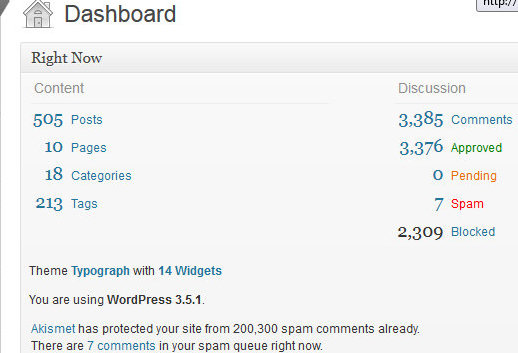
WP-Blackcheck


WP-Blackcheck did an excellent job of eliminating the trackback/pingback spam I receive, don’t you think? It blocked 2,309 trackback spam comments. As you can see, seven spam comments actually made it into my spam folder. However that spam was manually entered by a person. Anti-spam plugins won’t stop a real person from leaving a spammy comment. However since a persons first comments are always moderated on this site, they won’t ever make an appearance on Celebrate Life.

WP-Blackcheck-statistics. 382013 81344 AM


If I want to check out the Blocked comments this is what I see.

I most likely will test out a few other Plugins that do a similar job and keep the one that I like the most. I could always disable trackbacks completely, but presently I’m unsure if that’s what I want to do.

I hate captcha


For non-trackback spam, I could use Captcha to catch the autospammers… but I think Captcha is annoying! Don’t get me started on the illegible Captcha codes! I really dislike seeing it on sites that I follow! So why in the world would I add it to mine? Nope, not happening. Leaving a comment on a Captcha site, means one more thing I have to fill out just to comment on a persons site! Why oh why do some people want others to jump through extra hoops just to comment? Oh my goodness, don’t they know how annoying that can be?

I must say it’s a huge relief not seeing a whole bunch of spam waiting for me when I log into the admin panel.

Updating my theme

I use paid themes for my business sites, but haven’t gotten around to making the switch with this site, but that’s about to change. I’m really impressed with the FlexSqueeze theme. Sire has mentioned it a lot on his blog and I’ve decided to purchase it at the end of this month which will be about the time that I’ll be setting up a small site for my daughter so she can have a place to show her stop motion videos.

Since Sire has done a great job of promoting FlexSqueeze and he actually uses the product, I’ll purchase it through his affiliate link.


A drop in spam…

When I started (actively) blogging in late 2003 (or was that early 2004?) I didn’t have too much issue with spam, however as my sites became older and gained traffic I also experienced an increase in spam.

I-hate-spamFast forward to the present and the amount of spam I get is ridiculous. Easily over 800+ spammers daily! I’ve written about my dislike of spam before.

Even though the spam rarely makes it’s way on my site, I still find it annoying to see it in my admin panel!

There are many tools available to combat spam and over the years, I’ve tried many.

Earlier today, I did some behind the scenes maintenance to help me combat spam. I renamed my comments.php file and included a few additional rules in my .htaccess file.

Since trackback and pingbacks are the #1 way I receive spam comments, I also installed the  WordPress plugin WP-BlackCheck.  Even though it’s only been a few hours, I’ve noticed a decrease in the amount of spam I see in my admin panel. The developer is Stargazer, check them out at their site. I’ll keep an eye on the Plugin, but thus far I’m thrilled to see hardly spam in my comments queue.

Are you having issues with my plugins? I’ve logged out and sent some test comments and everything appears to be working properly. But if you run into any issues, send me a note and let me know if you’re experiencing any problems.

A long term want – iPad

iPad4I’ve been dreaming about the iPad since E-readers came on the scene. In fact, I blogged about them at a few technology sites where I wrote, and I along with other Mac fans speculated on when they’d finally appear.

Naturally when they were released I was thrilled! But I didn’t instantly log onto the Apple store and purchase one (Even though I had the funds to do so)… I waited. I originally wrote about purchasing an iPad  in 2010! Obviously money doesn’t burn a hole in my pocket, and it’s obvious I can sit on my wants for a loooooooooooooooong time. I’m zen-like with my patience. But now it’s time to think about purchasing an iPad and while I could purchase it now, I’ll hold off a few months longer. I’m starting to set aside money for this purchase and within a few months I’ll have one for myself.

I’m an avid book reader, but I’m running out of shelf space. I do know that one way I could reduce the amount of books I have is to simply transition to digital format for future books. Admittedly I’ve been fighting this, because I do love holding an actual book… but over the past few months I’ve been slowly getting accustomed to digital format by reading books on my desktop, laptop, and occasionally viewing things on the iPod that I purchased for my daughter at Christmas.

I’m still undecided as to which iPad I want, there’s a few generations available. I do know I want the maximum storage, and if it’s available I’ll definitely snap up a refurbished iPad to drop the price a bit. What I’ve always loved about Apple products is that you can get the same awesome warranty (Apple Care) on their refurbished products. I’m definitely not new to Apple products, I’ve been impressed with them since I purchased my MacBook Pro in 2006, since that time I’ve added other Apple products to our household. Apple makes great quality products and their warranty is awesome.

Windows 7 error message: Windows could not complete the installation…

Windows could not complete the installation. To install Windows on this computer, restart the installation.

This is definitely not a message you want to receive when you’re doing a new install…

But it’s what I encountered a few days ago when I chose to reinstall Windows 7 64 without losing my data.

What worked was shutting down the computer, and holding down Alt and F10 as soon as the computers power was back… I kept holding it down those keys until It brought me back to the reinstall menu. Depending on your computer you might have to use a different F key… but it’s worth a shot if it fixes the problem.

Ultimately I had to wipe out all the data since attempting to save the data brought the same error message again. I wasn’t too worried. I always back up my important files to another source (a external hard drive, and something else in my case) and so should you — if you aren’t already.

Photo Source: Orlando Sentinel

When it rains, it pours; Weak or no signal

It would appear that our household is on a roll with the technology glitches. Not only am I having issues with Windows 7 64 bit OS, but I’m having Direct TV issues also.

A few days ago, the flatscreen television in our family room, I’m not sure how big it is, I know it’s over 60″,brought up this lovely error message,

Weak or no signal

My first reaction was it has to be the HD Direct TV box. However, being the dutiful customer that I am, I called Direct TV and told them about the problem. Naturally they ran me throug list of tests of things that I’d already done (thanks to my online search). When those didn’t work, hey also suggested a new HDMI cable. While they would have supplied me one for free, I decided to stop by the store (after dropping off my daughter at school this morning) and purchase an additional cable. I connected it, and really wasn’t surprised that our Direct TV is still not working. I’m telling you, it’s the HD Direct TV box!

The customer service rep was polite, and now I’ll have a technician will be visiting our household next Friday to fix this issue. I’m not upset that I’m without Direct TV, I can go days, weeks, and in some cases months without watching television… and if I really feel the urge to watch something (I’m sure I won’t) there’s always the television in the basement. I take that back, last week my daughter and I did watch some nature shows. Those were quite fascinating. But as for regular shows, I rarely watch them. I find most of thee shows I’ve seen aren’t good, and in some cases a bit trashy. Which makes me wonder… when did I turn into my mom! 😉

Things are starting to slow down, so perhaps I’ll have a chance to post some crafts; crochet, knit, paper, etc, that my daughter and I’ve made over the past week.

Microsoft 7; slow internet connection and download speeds

The past few weeks I’ve been reacquainting myself with Windows 7 operating system.

The version we have is the Windows 7 Home Premium, 64 bit operating system. We’ve had this desktop computer for about a year… but it’s not my go to computer. That would be my 17″ MacBook Pro.

So much has changed since I received my MCSE, A+, and N+ certifications several years ago. I won a free N+ book — I figured I might as well study and take the cert.  All the certifications, I did for personal enrichment.

Anyway what caused the increased attention with this desktop computer is the sudden change in the computers internet and download speeds (down to about 26kbps), it’s moving at a snails pace. Yeah… definitely not fun for someone who’s used to screaming fast speeds. At least I’m not alone, from my online research it seems that some other Windows 7 users have experienced a sudden drop in their speeds also. I tried a lot of the suggestions but they didn’t work. I even tried reinstalling… nope that didn’t work either. Connecting the modem directly to the computer saw a jump in speeds, so I do think it might be the router.

The upside of this is I’ve ordered a few Windows 7 books… who knows I might update my Windows certifications. 😉

Still not on my MacBook Pro; Knitting with my Knit Picks Options circular needles

Besides a quick look at my 17″ MacBook Pro, I wasn’t able to do anything else. I’m thinking it might be my hard drive, hopefully I’ll have a chance to run a few tests today to see if I’m correct. Since I do use external hard drives, I’m not worried about data loss. My hard drive information is secured in a few places. That ailing MacBook Pro is my oldest Mac computer, I’ve had it for six years now, and for the most part I haven’t had any issues, so I can’t complain.

Since all my user information is stored on my MacBook Pro there are still items and sites that I don’t have access too, and I’ve resisted the urge to attempt to retrieve any of that information from the desk top — yet. But I might have to soon.

In other news…

Renovations at our home are almost finished, the contractor is working on the main bathroom, once that is complete we’ll be able to put items back in their normal place.

Having fun with my Knit Picks circular needles

Earlier this week I knitted a few preemie infant beanie hats. Soon, I’ll be dropping them off at a local hospital. Currently I’m working on a really soft and squishy scarf buttery yellow cabled scarf. I told you my Knit Picks interchangeable needles were getting a workout.

Once complete I’ll add it into my completed projects bin. I have a nice clear storage bin that contains all my crocheted, knitted, and sewed items that are being given to someone else. While quite a few of those hand crafted items have name tags, there are other items that don’t since I have no idea who’ll receive them. And such is the case with this scarf, currently, I’m unsure of whom I’ll honor with this gift. But based on the time spent making these intricate cables, the recipient will definitely be worthy of a handcrafted item.